
Using cryptocurrency safely involves more than protecting a wallet or keeping a seed phrase offline. Your web browser is often the bridge between you and the crypto ecosystem, connecting you to exchanges, decentralized applications, NFT platforms, block explorers, community websites, and wallet interfaces.
That makes the browser an attractive target for attackers.
A fake website, malicious browser extension, compromised advertisement, or convincing phishing page can potentially trick you into revealing credentials or approving a harmful transaction. Unlike traditional online accounts, cryptocurrency transactions are often irreversible, so a single mistake can have permanent consequences.
Fortunately, you can significantly reduce these risks with a few practical browser security habits.
Why Browser Security Matters in Crypto
Most crypto users spend a considerable amount of time interacting with blockchain services through a browser. Even when your cryptocurrency is stored securely in a wallet, the browser may still be responsible for displaying transaction details, connecting to decentralized applications, and initiating wallet requests.
Attackers know this.
Instead of attempting to break the cryptography protecting a blockchain, criminals frequently target the person using it. It is usually much easier to create a convincing fake website or malicious extension than to compromise the underlying blockchain network.
Browser security should therefore be considered part of your overall crypto security strategy.
Bookmark Important Crypto Websites
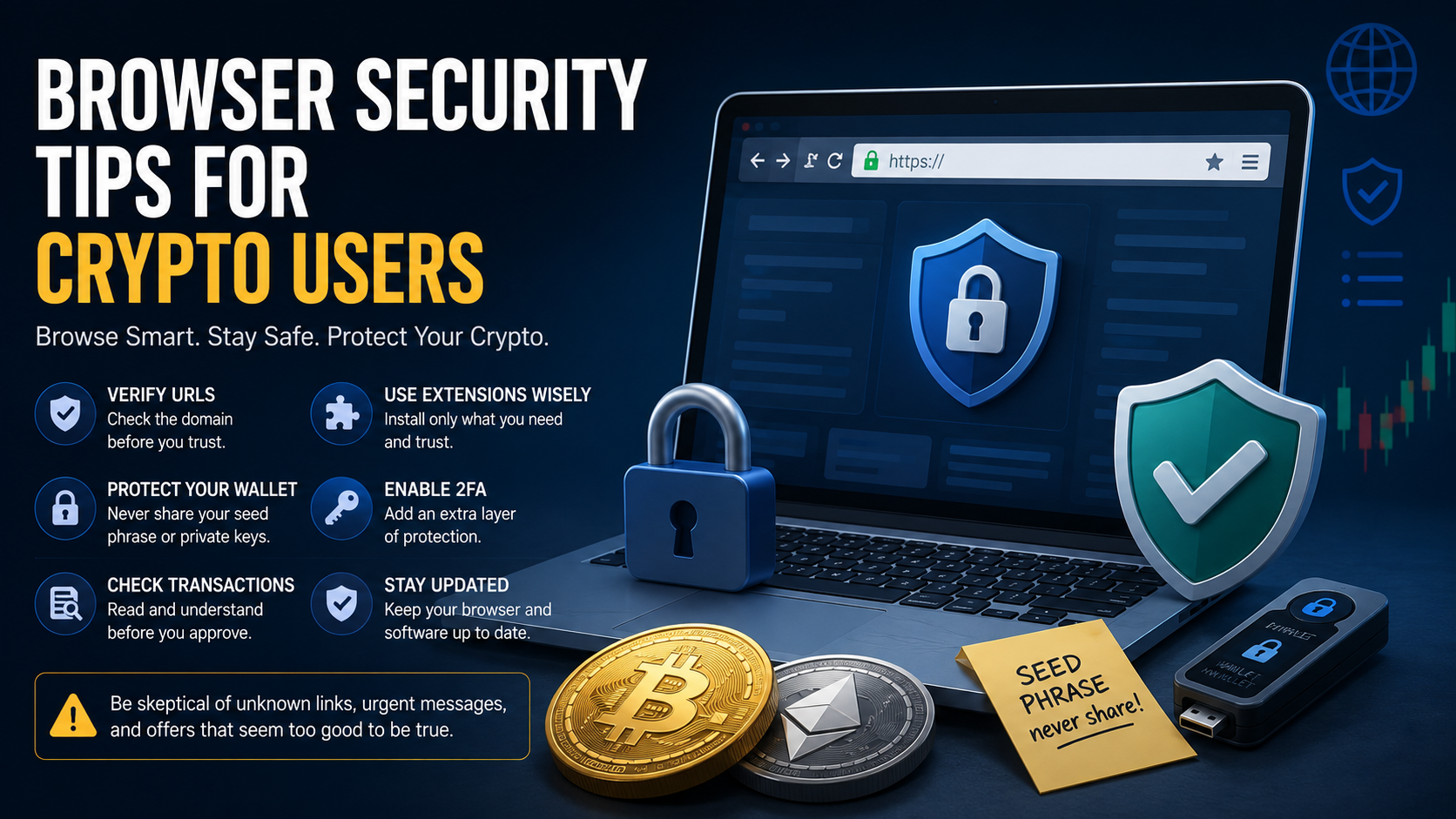
One of the simplest security measures is also one of the most effective: bookmark the websites you regularly use.
Crypto-related phishing websites frequently imitate exchanges, wallets, DeFi applications, and other popular platforms. Their domain names may differ from the legitimate website by only one character.
Searching for a platform every time you need it can increase your exposure to fake search results, misleading advertisements, and lookalike domains.
Once you have independently verified the correct website, save it as a bookmark and use that bookmark whenever possible.
This is particularly useful for:
- Cryptocurrency exchanges
- Web-based wallet interfaces
- DeFi applications
- NFT marketplaces
- Blockchain bridges
- Staking platforms
- Frequently used blockchain explorers
Still check the address occasionally. A bookmark is useful only if the correct website was bookmarked in the first place.
Check the Domain Carefully
Before entering credentials, connecting a wallet, or approving a transaction, look at the actual domain displayed in your browser.
Attackers often register domains designed to resemble legitimate ones. They may add extra words, change letters, use unusual subdomains, or create names that look almost identical at a glance.
For example, a fake website might replace a letter with a similar-looking character or add terms such as "official," "wallet," or "app" to make the address appear legitimate.
Do not judge a website purely by its design. Modern phishing websites can closely reproduce the appearance of legitimate services.
The domain itself is one of the most important things to verify.
HTTPS Is Important, but It Does Not Prove a Website Is Legitimate
Modern browsers display security indicators when a website uses HTTPS. This means the connection between your browser and the website is encrypted.
However, HTTPS does not mean the website itself is trustworthy.
Phishing websites can also obtain valid HTTPS certificates.
Therefore, seeing the padlock or HTTPS should never be treated as proof that a crypto website is legitimate. You still need to verify the domain and the service you are interacting with.
Be Extremely Selective With Browser Extensions
Browser extensions can have significant access to your browsing environment.
Depending on their permissions, extensions may be able to read or modify information displayed on websites, interact with browser tabs, or monitor certain browser activity.
This makes unnecessary extensions an avoidable security risk.
Install extensions only when you genuinely need them, and preferably obtain them through official links provided by the project's verified website or documentation.
Periodically review your installed extensions and remove anything you no longer use.
You should also be suspicious if an extension suddenly requests additional permissions after an update.
The fewer extensions you install, the smaller your browser's potential attack surface.
Watch Out for Fake Wallet Extensions
Crypto wallet extensions are particularly attractive targets for impersonation.
Attackers may create fake versions of popular wallets or distribute malicious extensions using similar names, logos, and descriptions.
A fake wallet extension may attempt to steal a seed phrase, private key, password, or other sensitive information.
When installing a wallet extension, verify it through the wallet provider's official website rather than relying solely on a search engine or extension marketplace search.
Never assume that something is legitimate simply because it appears in an official browser extension store.
Never Enter Your Seed Phrase Into a Random Website
Your wallet recovery phrase, commonly called a seed phrase, is effectively the master key to your cryptocurrency wallet.
Anyone who obtains it can potentially control the assets associated with that wallet.
Legitimate websites generally do not need your recovery phrase simply to connect to your wallet.
If a website claims that you must enter your seed phrase to:
- Verify your wallet
- Receive an airdrop
- Fix synchronization problems
- Upgrade your wallet
- Unlock an account
- Claim rewards
you should treat the request as highly suspicious.
Never paste a seed phrase into a website because someone in a Discord message, Telegram chat, email, social media post, or support conversation instructed you to do so.
Understand Wallet Connection Requests
Connecting a wallet to a website does not automatically mean that the website can take your cryptocurrency.
However, wallet interactions can lead to permission requests and transaction approvals.
Before approving anything, check what your wallet is actually asking you to authorize.
Be especially cautious when a website asks you to sign something unexpectedly or approve access to tokens.
A polished interface does not guarantee that the underlying transaction is safe.
Read Transaction Details Before Signing
Crypto users sometimes become accustomed to clicking "Confirm" whenever their wallet opens.
That habit can be dangerous.
Before signing a transaction, check as much information as your wallet provides, including:
- The network being used
- The destination address
- The asset involved
- The amount
- Token permissions
- Estimated fees
- Whether the request matches the action you intended to perform
If the transaction does not make sense, reject it.
You can always investigate and try again. Once a malicious blockchain transaction has been confirmed, reversing it may be impossible.
Be Careful With Token Approvals
Some blockchain applications require users to grant smart contracts permission to interact with tokens.
These approvals can sometimes allow a contract to spend a specific amount of a token. In other cases, the approval may permit much broader access.
Do not automatically approve unlimited token permissions simply because a website requests them.
Consider whether the requested permission is appropriate for what you are trying to do.
It is also useful to periodically review existing token approvals and revoke permissions you no longer need.
Consider a Separate Browser Profile for Crypto
A dedicated browser profile can provide useful separation between cryptocurrency activity and everyday browsing.
For example, you could maintain one browser profile specifically for crypto transactions with only the extensions you actually need.
Your regular profile could then contain social media tools, shopping extensions, productivity plugins, and other everyday software.
This does not make your crypto activity completely isolated, but it can reduce unnecessary exposure and make suspicious behavior easier to notice.
For higher-value wallets, some users go further and use a dedicated browser or separate device.
Keep Your Browser Updated
Browsers are complex applications, and security vulnerabilities are regularly discovered and patched.
Running an outdated browser may expose you to vulnerabilities that have already been fixed in newer versions.
Enable automatic browser updates when practical and restart your browser when an update requires it.
The same principle applies to your operating system, wallet applications, browser extensions, and other security-sensitive software.
Avoid Installing Unknown Software on a Crypto Device
Browser security cannot protect you from every threat on a compromised computer.
Malware running elsewhere on the system may attempt to steal credentials, manipulate clipboard contents, capture information, or interfere with browser activity.
Be particularly cautious with:
- Pirated software
- Cracked applications
- Unknown browser plugins
- Suspicious game modifications
- Files sent through private messages
- Unverified crypto tools
- Fake trading software
A device used for significant crypto holdings should ideally have a relatively clean and controlled software environment.
Do Not Trust Links Just Because Someone You Know Sent Them
A message from a familiar account is not automatically trustworthy.
Discord, Telegram, email, and social media accounts can be compromised. Attackers frequently use hijacked accounts to distribute phishing links because recipients are more likely to trust someone they recognize.
If a message unexpectedly claims that you can receive an airdrop, mint something for free, claim compensation, or participate in an urgent opportunity, verify the information independently.
This is especially important when the message pressures you to act quickly.
Be Suspicious of Urgency
Urgency is one of the most common tools used in phishing.
Messages may claim that:
- An airdrop expires in minutes
- Your wallet must be verified immediately
- Your exchange account is about to be suspended
- A limited mint is almost finished
- Your assets are at risk
- You must migrate tokens before a deadline
The goal is often to make you act before you have time to inspect the request carefully.
When money is involved, slowing down is usually a security advantage.
Use a Password Manager
A reputable password manager can help you create unique, strong passwords for exchanges and other crypto-related accounts.
It can also provide an additional defense against phishing.
Password managers generally associate stored credentials with particular domains. If your password manager normally fills your credentials on a website but suddenly does not recognize the page, that can be a warning sign that you are visiting a different domain.
Do not rely on this alone, but treat unexpected password manager behavior as a reason to check the URL carefully.
Enable Strong Two-Factor Authentication
For crypto exchanges and other custodial services, enable two-factor authentication whenever it is available.
Authenticator apps or hardware security keys generally provide stronger protection than relying only on a password.
SMS authentication can still provide an additional layer compared with using a password alone, but it can be vulnerable to attacks such as SIM swapping.
Also protect the email account connected to your exchange accounts. If an attacker compromises your email, they may be able to initiate password resets or intercept important security notifications.
Avoid Saving Sensitive Crypto Information in the Browser
Browsers are convenient places to store passwords, notes, autofill information, and other data.
That convenience can become a liability when extremely sensitive crypto information is involved.
Never store seed phrases or private keys in browser notes, bookmarks, autofill fields, or ordinary text documents simply because they are easy to access.
Recovery phrases should be stored securely offline using a method appropriate for the value and risk involved.
Be Careful When Copying Wallet Addresses
Clipboard manipulation malware can detect cryptocurrency addresses that you copy and replace them with an attacker's address.
Before sending cryptocurrency, compare the destination address shown in your wallet with the address you intended to use.
At minimum, verify several characters at both the beginning and end. For large transactions, use stronger verification methods where possible.
Sending a small test transaction first can also be worthwhile when transferring a significant amount to a new destination.
Consider Using a Hardware Wallet
A hardware wallet can add an important layer of protection by keeping private keys isolated from the browser and general-purpose computer environment.
However, a hardware wallet does not eliminate phishing.
If you approve a malicious transaction on the hardware device, the transaction may still be valid.
The hardware wallet's screen therefore matters. Verify transaction information on the device itself rather than blindly approving whatever your browser requests.
Separate Your Main Holdings From Your Active Wallet
Another useful strategy is to avoid using the same wallet for everything.
A wallet used regularly with experimental DeFi platforms, NFT projects, new applications, or unfamiliar websites naturally encounters more risk than one that rarely interacts with external services.
Some users separate their crypto into different wallets, for example:
Long-term storage: A wallet that rarely interacts with websites or smart contracts.
Active wallet: A wallet used with established services and applications.
Experimental wallet: A wallet containing limited funds for interacting with unfamiliar projects.
This approach limits how much may be exposed if one wallet interaction goes wrong.
Close Suspicious Tabs Instead of Interacting With Them
If a website suddenly displays a warning claiming that your wallet has been compromised, do not immediately follow its instructions.
Fake security alerts may tell users to connect a wallet, download software, call "support," or enter recovery information.
If something looks suspicious, close the tab and navigate independently to the legitimate service.
Do not use the links, phone numbers, downloads, or support contacts provided by the suspicious page.
Browser Security Is Only One Layer
No single security measure can completely protect cryptocurrency users.
A secure browser cannot compensate for revealing your recovery phrase. A hardware wallet cannot protect you if you knowingly approve a malicious transaction. Two-factor authentication cannot prevent every form of phishing.
Strong crypto security comes from combining multiple layers:
secure devices, updated software, carefully selected browser extensions, strong account authentication, verified websites, safe wallet practices, and cautious transaction approval.
Most importantly, develop the habit of verifying before trusting.
Final Thoughts
Blockchain technology can provide users with direct control over digital assets, but that control also comes with responsibility.
For many people, the browser is where the majority of interactions with cryptocurrency actually happen. That makes browser security just as important as choosing a trustworthy wallet or protecting a recovery phrase.
Bookmark important websites, minimize extensions, verify domains, keep your software updated, carefully inspect wallet requests, and never allow urgency to override caution.
A few extra seconds spent checking a URL or transaction can prevent a mistake that cannot be undone.

Pick your reaction
Post your comment