The BlockMap Discord bot is used to automatically verify server ownership, but is has other things to offer as well.
Mirror posts from dedicated channels to your community page as News articles
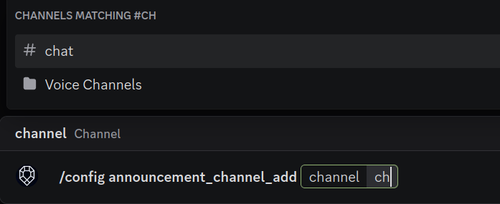
Use the /config announcement_channel_add command to add a channel to be mirrored.
You can add as many channels as needed. To remove a channel use the /config announcement_channel_remove command.
Set up a Voter role and have it assigned to people voting for your community
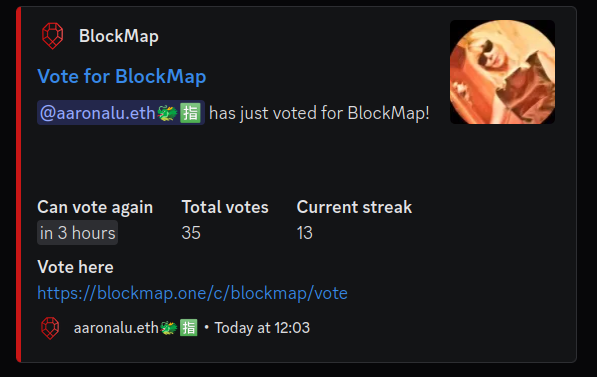
The bot can be configured to log votes for your community and / or assign a role to people who voted for your community.
This is what a vote log message looks like:
To configure a role:
Go to your Server Settings -> Roles and create a role
Make sure this role is below the bot's highest role in the list (hierarchy)

Use the /config voter_role command and select your role
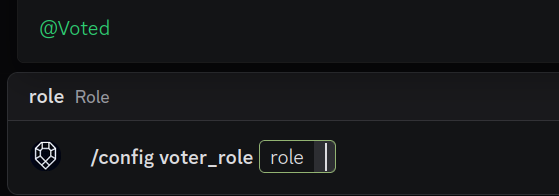
To configure vote logs:
Create a channel and make sure the bot can post messages there
Use the /config votes_log_channel and select the created channel
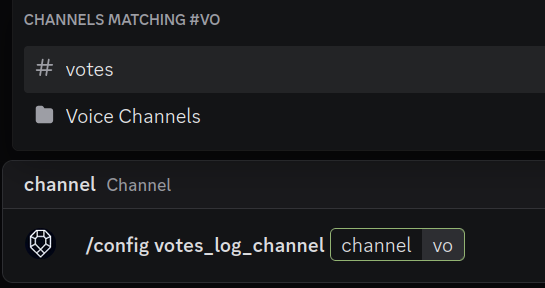
And that's it, your votes will get logged and the role assigned to your users.
To incentivize users to vote for your community we recommend giving the role special perks:
- Make it a special color to stand out.
- Give the role access to special channels.
- Periodically tip the role.
- Or whatever else you can think of!